

Description
Meta Description
ABB PP886 (3BSE092980R1) is a 15.4-inch standard touch operator panel under the Panel 800 series. It works with ABB System 800xA and Compact Product Suite, requires Panel Builder 800 V6.2 for programming. Each unit undergoes complete bench testing, ready for plant HMI replacement and maintenance.
Product Core Brief
- Model: PP886 / 3BSE092980R1
- Brand: ABB
- Series: Panel 800
- Core Function: Deliver operator monitoring and control interface for industrial automation systems
- Type: Touch Operator Panel (HMI)
- Key Specs: 15.4″ 1280×800 widescreen; Resistive touch; IP65 front protection; Dual Ethernet ports⚠️ Original production discontinued, limited surplus inventoryCondition: Tested surplus, non-refurbished
Product Introduction
When plant operators need a stable local visualization station for ABB DCS systems, the PP886 serves as the mainstream HMI choice within the Panel 800 platform. This 15.4-inch widescreen unit directly replaces the older PP885 model and fits seamlessly into System 800xA and Compact Product Suite architectures.
It adopts die-cast aluminum housing and LED backlight TFT display, supporting multi-language operation and vector-based process graphics. Compared with smaller Panel 800 models, the larger screen accommodates more process objects, alarm windows and trend curves without frequent page switching. The multiple serial and Ethernet ports enable flexible communication with ABB controllers and third-party automation equipment.
Key Technical Specifications
| Parameter | Details |
|---|---|
| Full Order Code | PP886 / 3BSE092980R1 |
| Display | 15.4 inch TFT LED, 1280 × 800 (16:10) |
| Touch Type | Resistive touch screen |
| Brightness | 450 cd/m² |
| Processor | ARM9 1.0 GHz |
| Memory | 1 GB RAM, 2 GB local SSD storage |
| Communication | 2 × Ethernet 10/100 Base-T; RS232; RS422/485; 2 × USB2.0 Host |
| Power Input | 24 VDC (18–32 VDC), max 31.2 W |
| Protection Grade | Front IP65 / Rear IP20 |
| Operating Temperature | -10 °C ~ +60 °C |
| Storage Temperature | -20 °C ~ +70 °C |
| Dimensions | 410 × 286 × 61 mm |
| Panel Cutout Size | 394 × 270 mm |
| Programming Software | Panel Builder 800 V6.2 or newer |
| Mounting | Panel mount, supports VESA 75×75 bracket |
Quality Control Procedure
- Incoming Source VerificationCheck serial number records and exterior condition. Inspect screen surface, touch foil, housing and connectors for scratches, discoloration or impact damage. Confirm no signs of prior repair work.
- Live Bench Function TestWe build a dedicated test environment with AC 800M controller. Every unit runs power-on inspection, touch calibration, Ethernet communication test, USB port verification, and continuous 24-hour aging test. A formal test report will be generated.
- Electrical Characteristic InspectionCheck power input stability and ground continuity. All measurement work uses calibrated Fluke 115 multimeters.
- Firmware & Project BackupRead and record the installed system firmware version. We can back up existing HMI project files if clients provide temporary upload access.
- Final QC & PackagingQualified panels are wrapped with anti-static foam and packed into export cartons. Each unit attaches a dated QC Passed sticker. We can share test photos or video records upon request.
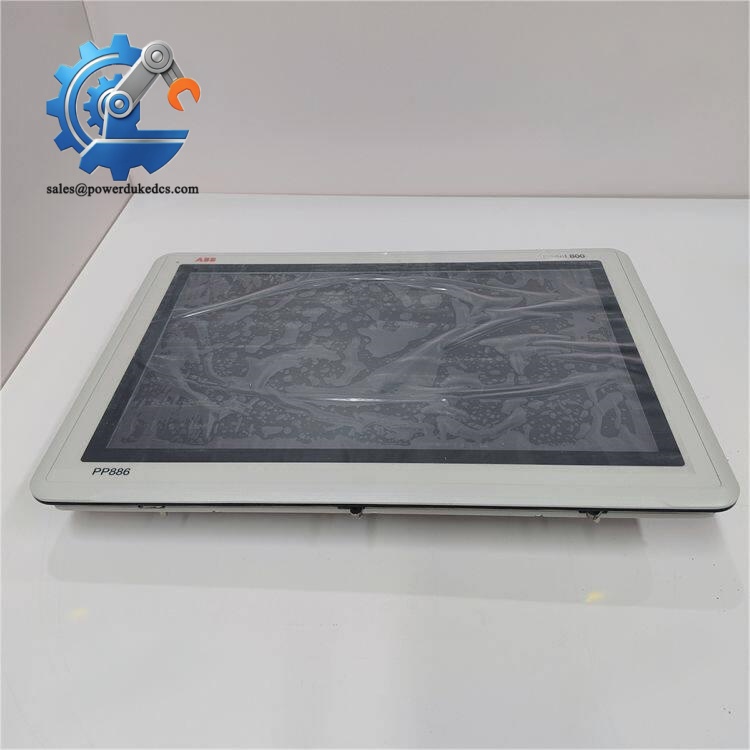
ABB PP886 3BSE092980R1
Field Pitfall Guide for Replacement
❗ Programming software version mismatch causes frequent project loading failures.I supported a chemical plant HMI swap project where technicians transferred a project developed on Panel Builder 800 V6.0. The PP886 rejects the project file and cannot start normally. Confirm your engineering software is upgraded to V6.2 minimum before downloading projects.
❗ Pay attention to touch screen calibration after installation.Transport vibration may shift touch coordinates. Always run touch calibration after powering on the new panel. Do not skip this step, otherwise click offset will confuse on-site operators.
❗ Confirm cabinet cutout dimension before ordering. shares similar appearance with PP886H, but housing depth and cutout dimensions have subtle differences. Double-check the cabinet hole size to avoid rework on site.
❗ Proper cable shielding and grounding for communication lines.Long-distance RS485 wiring without single-end grounding easily triggers signal jitter and communication dropouts. Separate power cables and communication cables to reduce electromagnetic interference.
Quick Conclusion
- This HMI is mainly matched with ABB 800xA and Compact Product Suite, not recommended for independent connection with non-supported controllers without protocol verification.
- Original factory new sealed units are no longer available via official ABB channels; stock quantity changes frequently.
- Request pre-shipment touch function and communication test records to reduce commissioning risks.
- If you need screen protective cover, match the RX886 touch cover model.
FAQ
Q1: Can directly replace PP885 without modifying cabinet cutout?A1: Physical cutout dimensions are compatible, but you must re-download project files and recalibrate touch screen after replacement.
Q2: Is this unit factory new sealed?A2: We supply fully tested surplus hardware. Factory sealed new units are out of official production.
Q3: Can you help convert existing HMI project files?A3: We provide hardware test documentation. Project migration and editing work needs support from your system integrator.
Q4: What is the standard warranty term?A4: 12-month warranty starts from shipment date, covering confirmed inherent hardware defects.
Recommended Publishing Channels
- Official website product page: Use full structure, keep specification table and complete QC workflow
- LinkedIn industrial post: Extract core parameters and application scenarios, shorten quality control paragraphs
- Automation forum content: Emphasize replacement traps and software version requirements



 Start Chat


