

Description
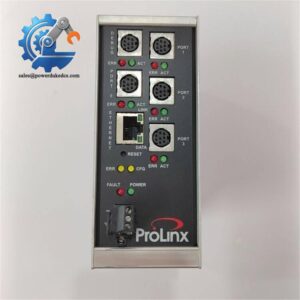
- ProSoft 5202-DFNT-MCM4 | Industrial Protocol Gateway for Modbus Serial Device Integration
Product Core Brief
- Model: 5202-DFNT-MCM4
- Brand: ProSoft Technology (ProLinx Series)
- Series: 5000 Series Standalone Protocol Gateways
- Core Function: Bidirectional data exchange between EtherNet/IP network and Modbus serial devices
- Type: Standalone Protocol Gateway
- Key Specs: 1 × 10/100M EtherNet/IP port | 4 independent serial ports (RS232/422/485) | Modbus RTU/ASCII Master/Slave
⚠️ Officially discontinued by ProSoft, limited surplus stock available
Condition: New Surplus, not refurbished
Key Technical Specifications
| Parameter | Specification |
|---|---|
| Full Part Number | 5202-DFNT-MCM4 |
| Network Protocol | EtherNet/IP (Explicit Messaging, Client & Server) |
| Serial Protocol | Modbus RTU / ASCII, Master or Slave configurable per port |
| Interfaces | 1 × RJ45 Ethernet; 4 × Mini-DIN 8 serial ports |
| Serial Electrical Standard | RS-232, RS-422, RS-485 (2-wire / 4-wire) |
| Baud Rate Range | 110 bps ~ 115,200 bps |
| Power Supply | 24 V DC (18–32 V DC), 500 mA typical |
| Mounting Method | Standard DIN rail mounting |
| Operating Temperature | -20 ℃ ~ +50 ℃ |
| Storage Temperature | -40 ℃ ~ +85 ℃ |
| Relative Humidity | 5% – 95%, non-condensing |
| Configuration Tool | ProSoft Configuration Builder (PCB Software) |
| OEM Status | End-of-life legacy gateway |
| Compatibility | Rockwell ControlLogix, CompactLogix, SLC500, PLC-5 EtherNet/IP controllers |
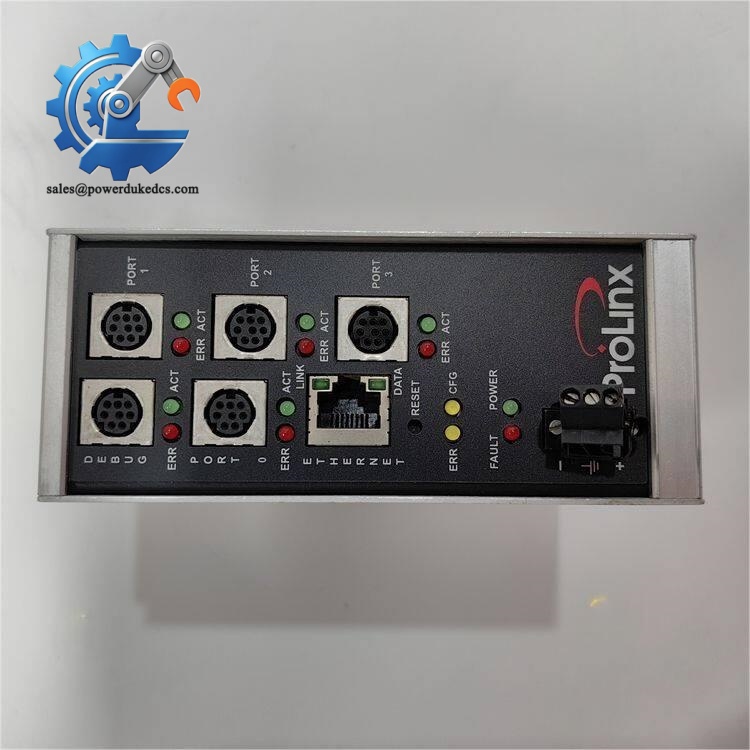
ProSoft 5202-DFNT-MCM4
Product Introduction
Application Scenarios & Pain Points
- Water & Wastewater Treatment Plants
Connect flow transmitters, level sensors, chemical dosing drives and power meters to ControlLogix systems. Multiple serial ports reduce the total number of gateways required for distributed instrumentation.
- Power Generation & Substation Auxiliary Control
Interface Modbus protection relays, energy meters and cooling system controllers to Rockwell PLCs. Stable protocol translation is required for continuous monitoring.
- Oil & Gas Pipeline Pump Stations
Remote Modbus RTU flow and pressure sensors communicate with central EtherNet/IP based control systems.
- Food & Beverage Manufacturing
Legacy variable frequency drives, thermal monitors and packaging machine sensors integrated into CompactLogix production control platforms.
- Building HVAC & Energy Management
Modbus energy meters and air handling unit controllers linked to factory EtherNet/IP SCADA.
A municipal wastewater treatment plant’s 5202-DFNT-MCM4 suffered power surge damage. Over 30 Modbus flow and level instruments went offline, forcing operators to rely on manual site inspection.
Compatibility & Replacement Matrix
Notes: Export and back up configuration file via ProSoft Configuration Builder before hardware swap. Verify serial port wiring and Mini-DIN adapter cables.
5201-DFNT-MCM2: Only 2 serial ports, not hardware equivalent; cannot directly replace.
Modern alternative: PLX31-EIP-MBS4. Not drop-in replacement; requires rework of wiring, IP planning and PLC program adjustment.
Quality Control Process
- Inbound Inspection
Check serial number and front panel labeling. Visual inspection for PCB corrosion, scratches, broken connectors and repair traces.
- ESD Controlled Operation
All testing performed on anti-static workbench with ESD wrist strap to protect internal communication chips.
- Bench Functional Test
Mount gateway on DIN rail test bench. Complete power-on self-test, EtherNet/IP communication test, independent Modbus master/slave testing on all four serial ports. Load saved configuration template for validation. A formal test report will be issued after passing.
- Configuration Documentation
Capture hardware photos and record MAC address for customer reference.
- Continuity & Power Rail Test
Eliminate internal short-circuit and power circuit failure risks.
- Final QC & Packaging
QC inspector confirms all test items passed. Gateway sealed inside anti-static bag, wrapped with bubble film and packed into export carton, attached with QC Passed label. Test photos or videos can be provided on request.
Field Replacement Pitfall Guide
-
Missing Configuration Backup
All serial port parameters, Modbus command lists and EtherNet/IP data mapping are stored inside the gateway.
Advice: Save the PCB project file before removing the faulty unit. I have encountered engineers who replaced hardware without backup, spending one full day rebuilding all register mapping manually.
-
Serial Port Wiring & Termination Issues
Mini-DIN 8 ports support RS485. Improper A/B polarity or missing 120 Ω terminal resistor leads to unstable communication and random timeouts.
Warning: Do not mix RS232 and RS485 wiring on the same port without reconfiguring software settings.
-
IP Address Conflict
The gateway retains the factory default IP unless restored. Assign IP address matching original settings to avoid EtherNet/IP network conflict.
-
Baud Rate & Modbus Parameter Mismatch
Each serial port has independent communication settings. New hardware restores default parameters after factory reset. Match baud rate, parity and stop bits with connected field devices.
-
Electrostatic Damage Risk
Front panel communication interfaces are sensitive to static discharge. Wear ESD protection when connecting serial cables in low-humidity environments.
-
Post-installation Validation
After commissioning, run continuous monitoring for minimum 6 hours. Verify periodic data refresh of all Modbus registers and check for communication error counters before returning to full operation.



 Start Chat


