

Description
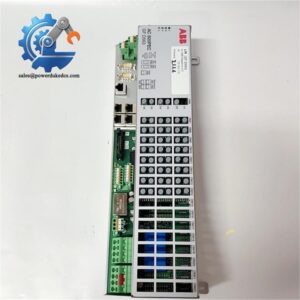
- ABB 3BSE008514R1 DO820 | Galvanic Isolated Digital Output Control Module
Product Core Brief
- Model: DO820 (3BSE008514R1)
- Brand: ABB
- Series: S800 I/O System
- Core Function: Transmit digital control signals from DCS controller to field actuators and solenoid valves
- Product Type: Digital Output Module
- Key Specs: 8 output channels, 24 V DC, galvanic channel group isolation
- Condition: New Original, non-refurbished surplus stock
⚠️ Production still active; stock lead time fluctuates periodically
Product Introduction
Key Technical Specifications
| Parameter Item | Technical Data |
|---|---|
| Full Part Number | DO820 / 3BSE008514R1 |
| Module Type | Digital Output Module |
| Channel Quantity | 8 digital outputs |
| Nominal Operating Voltage | 24 V DC |
| Output Type | Sinking / Sourcing configurable |
| Isolation Mode | Galvanic isolation per channel group |
| Max Channel Current | 0.5 A per single channel |
| Total Module Max Load | 4 A |
| Compatible Terminal Unit | TU810, TU812, TU814, TU830 series |
| Backplane Bus | S800 Internal I/O Bus |
| Mounting Method | DIN rail rack installation |
| Operating Temperature | 0 °C ~ +60 °C |
| Diagnostic Features | Short-circuit detection for each output channel |
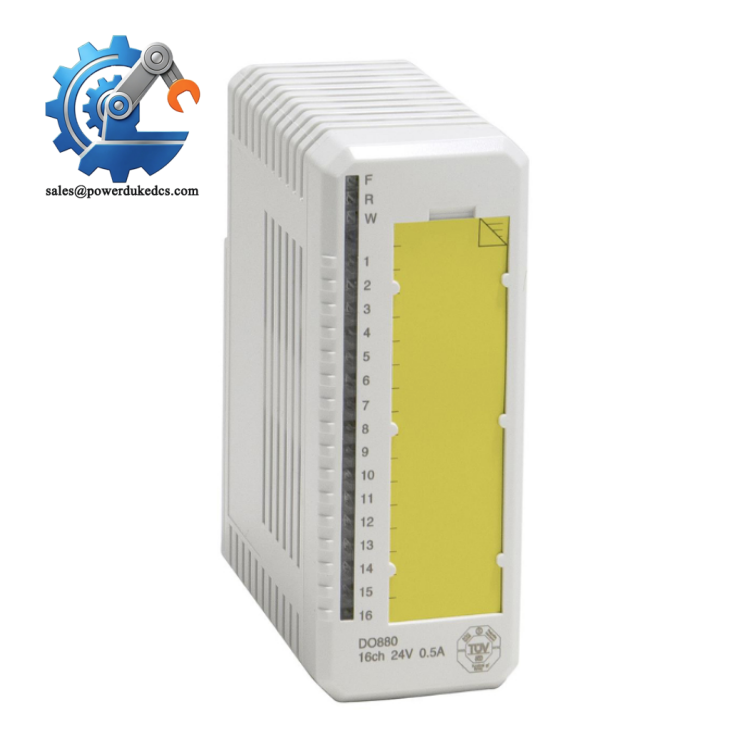
ABB 3BSE008514R1 DO82
Installation & Configuration Guide
Stage 1: Pre-Installation Preparation (10 mins)
Coordinate with operation staff for planned equipment shutdown. Execute safe state interlock logic for all actuators connected to this output module. Cut rack power supply and wait 5 minutes for capacitor discharge.
ESD wrist strap and anti-static mat, PH1 screwdriver, Fluke 115 multimeter, marking labels, mobile phone for configuration and wiring snapshots.
Upload the complete control project to local storage. Photograph original module position, terminal wiring and existing parameter settings inside Control Builder software.
Stage 2: Old Module Removal (12 mins)
Step 2: Loosen terminal screws counterclockwise and detach wires gently. Do not pull cables with brute force.
Step 3: Press the locking latch at the bottom of the module, pull the DO820 unit straight outward away from the terminal base. Avoid twisting motion to protect backplane connectors.
Step 4: Check terminal unit contacts. Blow away accumulated dust with dry compressed air. Inspect pins for corrosion or bending.
Stage 3: New Module Installation (15 mins)
Step 2: Verify part number DO820 / 3BSE008514R1. Do not mix up with DO810 or DO840 similar modules.
Step 3: Align module with terminal base connector, push horizontally until locking latch clicks firmly. Keep the module level during insertion.
Step 4: Reconnect all field wiring following captured photos. Tighten terminal screws with moderate torque around 0.4~0.6 N·m.
Module fully locked to terminal base ✅ | All field cables secured ✅ | No exposed bare conductors ✅ | Slot position matches original layout ✅
Stage 4: Power-On & Commissioning (20 mins)
Step 1: Restore power to S800 I/O rack and observe front LED indicators. Solid green RUN lamp signals normal initialization.
Step 2: Launch Control Builder, scan the hardware tree to confirm the module is detected in the correct slot address.
Step 3: Match hardware configuration to the saved project; download parameters if needed.
Step 4: Manually force each output channel one by one. Verify corresponding field actuators respond as expected and channel diagnostic status stays normal.
Step 5: Maintain continuous running for minimum 30 minutes. Watch for abnormal error alarms. Update site maintenance log with serial number and replacement date.
Quality Inspection Process
- Warehouse Entry Verification
Match label part number 3BSE008514R1 against specification records. Visual check for housing scratches, connector damage and traces of prior disassembly. Check enclosed documents including datasheets.
- Live Bench Testing
Install module onto standard S800 test rack. Complete power-on self-test, backplane bus communication test and full 8-channel output simulation. Continuous aging test runs 24 hours to track stability. Test reports available upon request.
- Electrical Parameter Testing
Carry out insulation resistance test with 500 V megohmmeter. Confirm channel isolation performance and check for internal short circuits.
- Hardware Information Recording
Log hardware revision and serial number for traceability. Capture LED status behaviour under normal and fault conditions.
- Final QC & Packaging
Passed modules sealed inside anti-static bags, wrapped with bubble film and packed into cartons. QC Pass label attached with inspection date. Test photos or video can be supplied for customer verification.
Field Replacement Pitfall Guide
DO820 shares similar appearance with DO810 and DO840. Electrical specifications and channel diagnosis functions differ. Direct substitution without software adjustment triggers channel faults. Confirm model code before installation.
Each channel supports maximum 0.5 A load. Directly driving large contactors without intermediate relays creates repeated overcurrent alarms and burns output drivers. We encountered one site that damaged two modules within a month due to this mistake.
DO820 supports configurable signal modes. Mismatch between wiring type and software parameter stops outputs from switching. Always align field wiring with project configuration settings.
Output driver semiconductors remain sensitive to static electricity. Operators without anti-static gear risk intermittent channel failures that cannot be replicated during routine testing.
DO820 cannot pair with every S800 terminal base. Using incompatible TU units causes unstable communication or missing channel diagnostics. Stick to TU810, TU812, TU814 or TU830 series.
Frequently Asked Questions (FAQ)
-
Can ABB DO820 work together with AC800M controllers?
Yes. It is a standard S800 I/O module natively supported by AC800M Control Builder software. No extra gateway is required.
-
Does DO820 support hot swapping while the rack remains powered?
Hot-swap function depends on the matched terminal unit. Confirm terminal model specifications; improper hot-swap may trigger brief bus interruptions. Power-off replacement remains the safest practice.
-
Is channel short-circuit protection built into DO820?
Yes. Every channel has independent short-circuit detection. The module will generate diagnostic alarms once abnormal load conditions are detected.
-
What warranty is offered for stocked DO820 3BSE008514R1?
All units carry a 12-month warranty after shipment. Complete functional testing is finished before delivery. Damage caused by overload, wrong wiring or static discharge is not covered.
-
Can DO820 drive solenoid valves directly?
Small low-power 24 V DC solenoid valves can be connected directly. High-power loads require auxiliary intermediate relays to stay within current limits.
-
What is the stock availability for DO820?
We maintain spot inventory for fast dispatch within 1–3 working days. Official factory supply cycles change regularly. Confirm real-time stock status before placing formal orders.



 Start Chat


