

Description
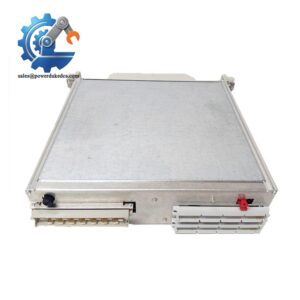
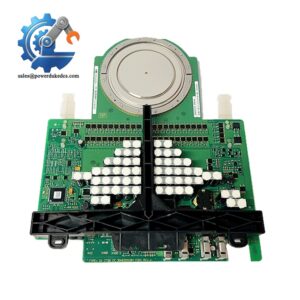
ABB 500CPU05 1MRB150081R1E Industrial PLC CPU Module
Product Core Brief
-
Model: 500CPU05 1MRB150081R1E
-
Brand: ABB
-
Series: AC500 PLC Series
-
Core Function: Executes industrial logic control and system data processing for automated production lines
-
Type: PLC Main CPU Control Module
-
Key Specs: 10 MHz clock frequency, 128 KB internal memory, Modbus serial communication support
-
Condition: New Surplus, non-refurbished, full factory integrity
Product Introduction
Unplanned PLC CPU failures can halt entire production workflows, causing unplanned downtime and maintenance delays. The ABB 500CPU05 1MRB150081R1E serves as the core control unit tailored for mid-range industrial automation scenarios. It operates as the central processing core of ABB AC500 PLC systems, undertaking logic operation, data calculation and equipment linkage control tasks for on-site automation equipment.
This module adopts a mature 80196 processor architecture with stable 10 MHz operating frequency and 128 KB built-in storage space, enough to support complex user program compilation and continuous operation. It supports multi-speed serial communication from 9.6 kbit/s to 115.2 kbit/s, ensuring smooth data interaction with HMI and upper computer systems. Field-verified for over a decade, this CPU delivers steady performance in manufacturing and process industries, with extended temperature adaptability for harsh workshop environments. Well, technically it requires standardized cabinet heat dissipation to maintain optimal long-term operation.
Key Technical Specifications
|
Parameter Item
|
Technical Value
|
|---|---|
|
Processor Model
|
80196 Industrial CPU
|
|
Clock Frequency
|
10 MHz
|
|
Internal Memory
|
128 KB
|
|
Communication Baud Rate
|
9.6 kbit/s – 115.2 kbit/s (configurable)
|
|
Supported Protocol
|
Modbus Serial Protocol
|
|
Working Temperature Range
|
-20 °C to +60 °C (standard industrial grade)
|
|
Cooling Mode
|
Natural convection cooling
|
|
Mounting Method
|
DIN rail horizontal/vertical mounting (derating required for vertical installation)
|
|
Protection Features
|
Overload, overvoltage, undervoltage and short-circuit protection
|
|
External Power Supply
|
24 V DC ±10%
|
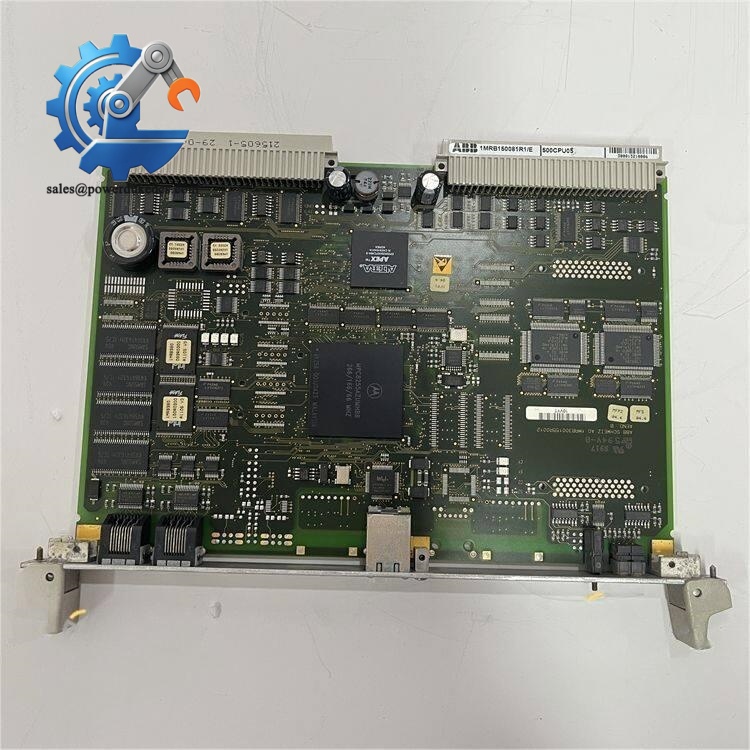
ABB 500CPU05 1MRB150081R1E
Installation & Configuration Guide
Stage 1: Pre-Installation Preparation (10 Minutes)
⚠️ Safety Priority
Notify production staff of scheduled downtime and switch all on-site equipment to safe stop status. Cut off the entire control cabinet power supply including UPS backup power, then wait 5 minutes for internal capacitor full discharge to avoid electric shock or module burnout.
Tool Preparation
ESD wrist strap and anti-static mat, PH1 cross screwdriver, Fluke 115 multimeter, label stickers, marker pen and mobile phone for configuration recording.
Data Backup
Export the complete running program of the original system to USB flash drive and cloud disk. Take clear photos of the old module’s terminal wiring status, DIP switch positions and overall cabinet layout for accurate configuration replication.
Stage 2: Old Module Removal (10 Minutes)
1. Remove the module front cover by gently pressing the side buckles and lifting upward.
2. Mark each cable terminal number with labels, loosen terminal screws counterclockwise, and pull out wires steadily without violent dragging to prevent terminal damage.
3. Press down the DIN rail buckle at the module bottom with a flat screwdriver, pull the module outward vertically to separate from the backplane connector.
4. Inspect backplane pins for bending or dust accumulation; clean dust with compressed air if needed, do not touch pins directly by hand.
⚠️ Note: Save all configuration stickers on the old module before removal, these records help avoid configuration errors in new module commissioning.
Stage 3: New Module Installation (15 Minutes)
1. Wear ESD protective gear before taking the ABB 500CPU05 1MRB150081R1E module out of anti-static packaging.
2. Verify the full model number to confirm consistency with the replaced unit.
3. Key Configuration Replication: Adjust DIP switches strictly according to old module photos, confirm node address and communication baud rate match on-site system parameters, set terminal resistance OFF for middle bus nodes.
4. Align the module with cabinet backplane, insert vertically and press firmly until the buckle clicks into place, check no tilting relative to adjacent modules.
5. Restore wiring one by one per recorded labels, fasten terminal screws with moderate torque, and tug wires slightly to confirm firm connection.
Self-Check List
DIP switch settings verified ✅ | All cables connected ✅ | Module locked in place ✅ | No residual tools in cabinet ✅
Stage 4: Power-On & Functional Testing (20 Minutes)
Before powering on, test bus voltage with multimeter to ensure 24 V DC normal range and no short circuit between power and ground terminals.
1. Power on the control cabinet independently first, observe module LED status: steady green RUN light means normal startup; flashing red ERR light indicates abnormal startup requiring fault code check.
2. Connect ABB programming software, scan network devices to identify the new CPU module, read and record the factory firmware version.
3. Import the pre-backed-up system program, compile and download completely, switch the system to RUN mode after download completion.
4. Simulate on-site logic actions, test equipment linkage and HMI communication stability, confirm no data delay or communication timeout.
5. Keep the system running continuously for 30 minutes, check no alarm codes appear, record module serial number and replacement time in equipment maintenance log.
Frequently Asked Questions (FAQ)
1. Is the ABB 500CPU05 1MRB150081R1E plug-and-play for old AC500 systems?
Not fully plug-and-play in all cases. We have encountered on-site cases where old systems with low firmware versions fail to recognize new modules. You need to confirm the original system firmware version before replacement; minor firmware upgrades or downgrades can solve compatibility issues perfectly.
2. What is the core difference between 500CPU05 and other AC500 series CPU modules?
This model features fixed 10 MHz clock frequency and 128 KB fixed memory, positioning for conventional standard automation control scenarios. Compared with high-end models, it has balanced cost performance without redundant high-performance configurations, making it more suitable for ordinary production line logic control tasks.
3. Can this CPU module support hot-swap replacement during system operation?
No. This ABB AC500 series CPU does not support hot swapping. Mandatory power-off replacement is required. Hot swapping will cause instantaneous circuit surge, easily burning the backplane connector and leading to permanent module damage.
4. How long is the warranty period for this new surplus module?
We provide a full 12-month industrial warranty. All modules pass complete machine testing before delivery. If non-human damage occurs during normal use within the warranty period, we support free after-sales maintenance and replacement services.
5. What communication distances can the Modbus serial interface support?
With standard shielded cables, the maximum stable communication distance reaches 100 m. For longer transmission distances, signal repeaters are required to avoid data loss or communication jitter.
6. Will vertical installation affect module operating performance?
It will. Vertical mounting requires load derating. The module’s heat dissipation efficiency decreases in vertical installation, which will reduce the maximum output load by 50% at ambient temperature above 40 °C. Horizontal installation is recommended for long-term stable operation.



 Start Chat


