

Description
Product Core Brief
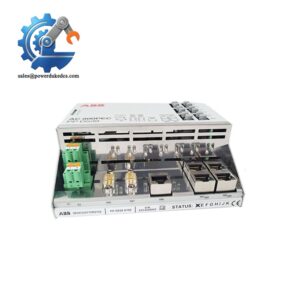
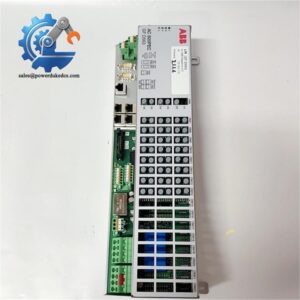
- Model: CI502-PNIO (1SAP220700R0001)
- Brand: ABB
- Series: S500 I/O System
- Core Function: Operates as PROFINET IO RT device for distributed field signal collection and transmission
- Product Type: PROFINET Bus Interface Module
- Key Specs: 24 integrated digital channels, dual RJ45 Ethernet, expandable up to 10 external I/O modules
- Condition: New Original, non-refurbished surplus stock
⚠️ Standard version available; XC extended temperature variant sold separately
Product Introduction
Key Technical Specifications
| Parameter Item | Technical Data |
|---|---|
| Full Order Code | CI502-PNIO / 1SAP220700R0001 |
| Communication Standard | PROFINET IO RT, certified device |
| Ethernet Interface | Dual RJ45, integrated 2-port switch |
| Onboard I/O Configuration | 8 × DI, 8 × DO, 8 × configurable DI/DC |
| Signal Level | 24 V DC; DO max load 0.5 A per channel |
| Expansion Capacity | Supports up to 10 additional S500 I/O modules |
| Address Setting | Two rotary switches for device ID configuration |
| Mounting Form | Standard DIN rail mounting |
| Terminal Unit Match | TU507-ETH (screw) / TU508-ETH (spring) |
| Operating Temperature | 0 °C ~ +60 °C (standard version) |
| Module Isolation | Galvanic isolation between field side and bus circuit |
| Special Function | Integrated fast counter on configurable channels |
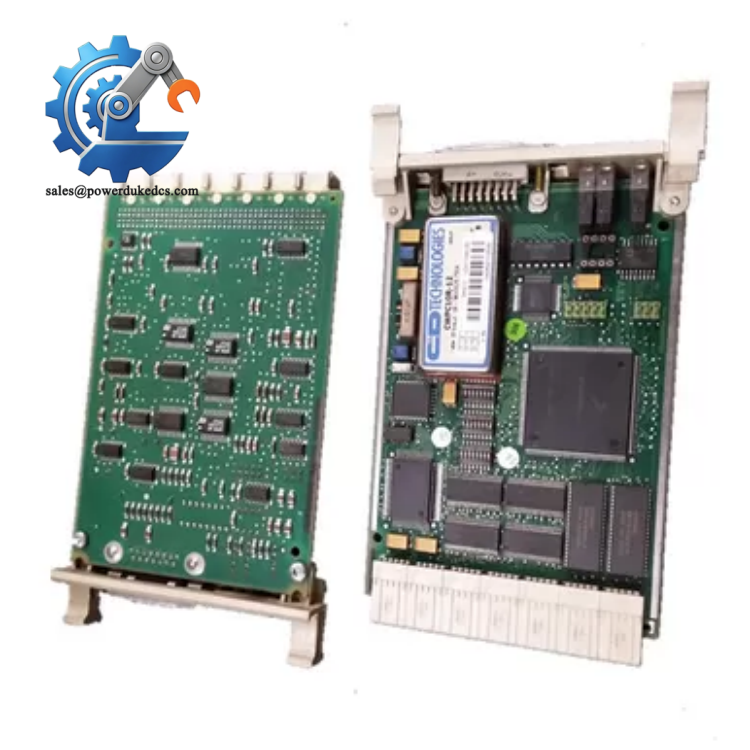
ABB 1SAP220700R0001 CI502-PNIO
Installation & Configuration Guide
Stage 1: Pre-Installation Preparation (10 mins)
Notify maintenance staff of scheduled downtime. Shift connected production equipment to safe stop mode. Cut off 24 V DC power for the remote I/O station and wait 5 minutes for capacitor discharge.
ESD wrist strap and anti-static mat, PH1 screwdriver, Fluke 115 multimeter, marker labels, mobile phone for snapshot records.
Save all station parameter settings from engineering software. Capture clear photos of rotary switch positions, wiring layout and existing network topology.
Stage 2: Old Module Removal (12 mins)
Step 2: Loosen terminal screws counterclockwise and detach cables gently. Avoid pulling conductors directly.
Step 3: Unlock DIN rail latch at the module bottom, slide the unit outward vertically. Do not twist the module while separating from the terminal base.
Step 4: Inspect TU507-ETH or TU508-ETH terminal unit. Clear dust on pin contacts with dry compressed air.
Stage 3: New Module Installation (15 mins)
Step 2: Confirm full part number CI502-PNIO matches replacement requirements. Do not confuse standard model with CI502-PNIO-XC.
Step 3: Adjust the two rotary switches to replicate the original device ID according to saved photos.
Step 4: Clip module onto DIN rail, push firmly until the locking mechanism clicks into place. Align module edge with adjacent hardware.
Step 5: Reconnect all field wiring and Ethernet cables following labeled records. Tighten terminals with moderate torque around 0.5 N·m.
Rotary switch address matched ✅ | Ethernet cables correctly plugged ✅ | All terminals secured ✅ | No loose wiring exposed ✅
Stage 4: Power-On & Commissioning (20 mins)
Step 1: Switch on station power and observe front panel LEDs. Solid green PWR/RUN light indicates normal startup.
Step 2: Open engineering tool, scan the PROFINET network to detect the new I/O station. Confirm online identification matches configured device name.
Step 3: Download station parameters and I/O mapping settings. Switch the module into online operation mode.
Step 4: Trigger each digital input and output manually to check channel status LEDs match software feedback.
Step 5: Maintain continuous running for 30 minutes. Confirm no communication dropouts or channel error alarms. Save updated maintenance records.
Quality Inspection Process
- Warehouse Entry Verification
Cross-check part number 1SAP220700R0001 against factory labels. Complete visual inspection for housing scratches, connector deformation and disassembly traces. Verify original accessory list including datasheet documents.
- Live Bench Testing
Mount the module on standard S500 test rack. Complete power-on self-test, PROFINET communication handshake and full channel I/O simulation. Execute 24-hour continuous aging monitoring. Test reports are generated for each unit.
- Electrical Parameter Testing
Perform insulation resistance test with 500 V megohmmeter. Verify ground continuity and eliminate hidden circuit defects.
- Hardware Parameter Recording
Read and log hardware version information. Document default rotary switch positions for reference.
- Final QC & Packaging
Approved modules sealed inside anti-static bags, wrapped with bubble film and packed into cartons. QC Pass sticker attached with inspection date. Test photos or video can be shared upon customer request.
Field Replacement Pitfall Guide
Many technicians overlook the two rotary switches. Random settings create duplicate device IDs on the PROFINET network. We met one case where incorrect address blocked all remote I/O communication for three hours. Always copy original settings precisely.
CI502-PNIO and CI502-PNIO-XC share identical outer appearance. The XC variant supports wider temperature ranges. Using standard version in high-temperature workshops causes unstable long-term operation. Confirm ambient working range before purchase.
The dual Ethernet ports support linear topology, but misconnecting ETH1 and ETH2 breaks the whole network segment. Do not swap port sequence arbitrarily during cable replacement.
Communication chips on bus modules are sensitive to static discharge. Operation without anti-static equipment may lead to intermittent Ethernet connection loss, which proves difficult to reproduce during fault diagnosis.
This module requires matching TU507-ETH or TU508-ETH base unit. Older terminal bases without ETH circuits cannot support network connection. Do not reuse mismatched terminal hardware.
Frequently Asked Questions (FAQ)
-
Can CI502-PNIO work as a remote I/O station for ABB AC800M controllers?
Yes. It operates as a standard PROFINET IO device. Complete GSD file matching is required during project configuration. Minor parameter adjustments may be needed for older controller firmware revisions.
-
Does this module support hot swapping while the PROFINET network stays online?
Module hot-swap is not supported. You need to cut off local station power before removal. Live extraction leads to temporary bus disturbance and potential hardware damage.
-
What maximum I/O capacity can one CI502-PNIO station achieve?
It has 24 built-in channels. Users can attach up to 10 extra S500 expansion modules on the internal I/O bus to expand signal capacity further.
-
What warranty coverage applies to CI502-PNIO?
All stocked units carry a 12-month warranty. Full function testing is finished before shipment. Damage from wrong wiring, overload or static discharge falls outside warranty coverage.
-
Can configurable DI/DC channels be set as high-speed counters?
Yes. The 8 configurable channels support fast counter functions after software parameter setup. Counter specifications follow official ABB S500 datasheet.
-
Stock and delivery timeline for CI502-PNIO?
Physical stock available for shipment within 1–3 working days. Original production continues, but inventory fluctuation occurs frequently. Confirm real-time stock status before issuing formal purchase orders.



 Start Chat


