

Description
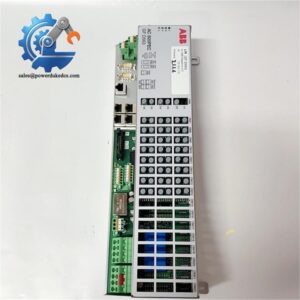
- ABB CI547 Hot-Swappable Communication Card For Industrial MRO Maintenance
Product Core Brief
- Model: CI547
- Part Number: 3BSE012546R1
- Brand: ABB
- Series: AC800M / System 800xA Communication Series
- Core Function: Enables AC800M controllers to operate as DeviceNet slave nodes for fieldbus data exchange
- Type: Fieldbus Communication Interface Module
- Key Specs: Hot-swappable, CEX backplane bus, 125/250/500 kbps baud rate, DB9 fieldbus port
- Condition: New Surplus, factory sealed, non-refurbished
⚠️ Discontinued legacy module, limited buffer stock for plant emergency MRO replacement
Product Introduction
Key Technical Specifications
| Parameter Item | Technical Specification |
|---|---|
| Full Model | CI547 (3BSE012546R1) |
| Bus Protocol | DeviceNet Slave Mode Only |
| Backplane Interface | CEX Bus for AC800M Rack |
| Field Connector | DB9 Male Port |
| Support Baud Rates | 125 kbps / 250 kbps / 500 kbps |
| Hot Swap Support | Yes |
| Module Indicators | RUN, COM, FAULT Status LEDs |
| Configuration Tool | Control Builder M |
| Operating Temperature | -20 °C to +60 °C |
| Storage Temperature | -40 °C to +70 °C |
| Compatible Systems | AC800M, System 800xA |
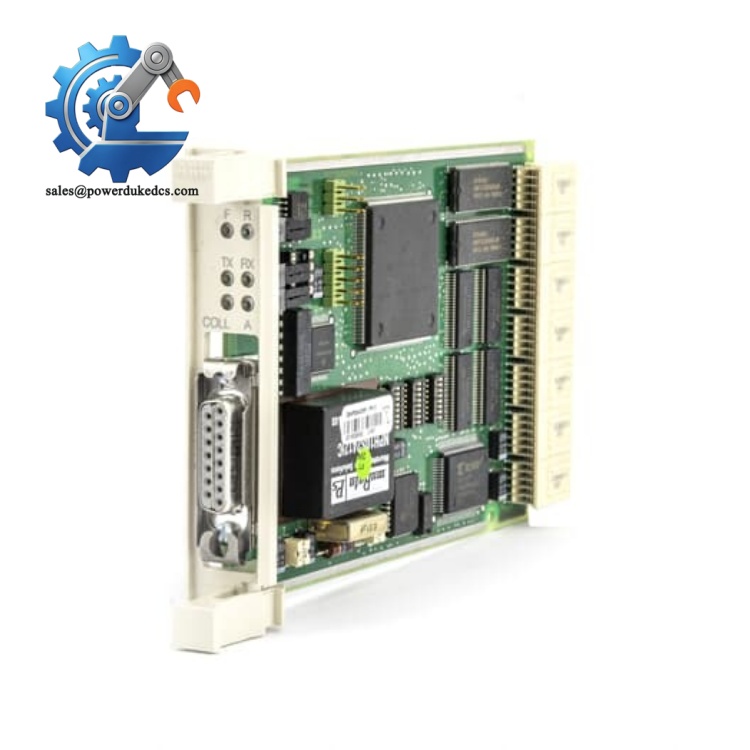
ABB CI547
Installation & Configuration Guide
Stage 1: Pre-Installation Preparation (10 Minutes)
Stage 2: Old Module Removal (8 Minutes)
Inspect the CEX backplane slot for dust or oxidation. Clean residual debris with dry compressed air. Keep all bus cable labels intact for reinstallation.
Stage 3: New Module Installation (12 Minutes)
Insert the module into the designated rack slot and push firmly until latches click into place. Reconnect the DeviceNet DB9 cable. Verify 120 Ω termination resistor placement only at both bus endpoints.
Import saved hardware configuration via Control Builder M. Match node address and baud rate strictly to original parameters. Download updated project to the controller.
Stage 4: Power-On & Commissioning (15 Minutes)
Solid green RUN light means normal startup. Blinking COM light indicates valid bus data exchange. No FAULT light confirms error-free operation.
Verify real-time I/O data consistency between master station and controller. Run continuous monitoring for over 30 minutes with no timeout or dropout alarms. Update on-site equipment logs with new module serial number.
Standard Quality Inspection SOP
Field Replacement Pitfall Guide
Different CI547 firmware revisions carry subtle bus protocol differences. Restoring old configuration files directly may cause intermittent communication timeout errors. I have seen site cases where unchanged firmware settings led to half-day debugging. Always verify firmware compatibility before download.
CI547 is slave-only; CI546 is master-only. The two modules share identical appearance but zero interchangeability. Mixing them will cause total bus network failure. Double-check part number before installation.
Improper 120 Ω resistor placement distorts DeviceNet signal waveforms. Adding resistors at middle nodes or missing endpoints creates random offline faults. This simple mistake causes frequent on-site rework.
Communication chips are highly ESD-sensitive. Dry cabinet environments raise damage risks. Unprotected handling can burn internal circuits without visible marks. Always wear ESD protection during replacement.
New modules restore factory default node addresses. Failure to modify parameters before online operation leads to network address duplication and bus paralysis.
Frequently Asked Questions (FAQ)
No. This module supports slave mode exclusively. Use CI546 for master-level bus control scenarios.
Hardware supports hot swap. Bus communication will interrupt temporarily during swapping. For critical production loops, perform replacement during scheduled outage windows.
We maintain limited buffer stock for discontinued DCS spare parts. Items ship within 1–3 working days. All units come with 12-month industrial warranty and remote technical support.
Common failure signs include constant FAULT alarms, unrecognizable hardware by controller, frequent bus timeouts, and zero COM activity during normal network operation.
Controller program and local control logic remain intact. Only DeviceNet fieldbus communication pauses during replacement. Other system functions stay stable.
Yes. We provide pre-shipment test records and firmware version data. Technical teams support remote parameter setup, I/O mapping verification and bus debugging.



 Start Chat


