

Description
Product Core Brief
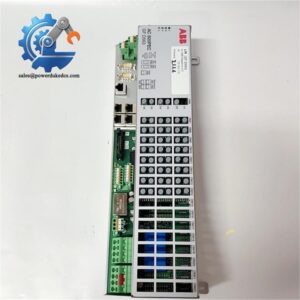
- Model: SUE3000 1VCR007346 G0032
- Brand: ABB
- Series: SUE3000 High Speed Transfer Device (HSTD / HSTS)
- Core Function: Local parameter configuration, status monitoring and manual operation for medium voltage bus fast transfer units
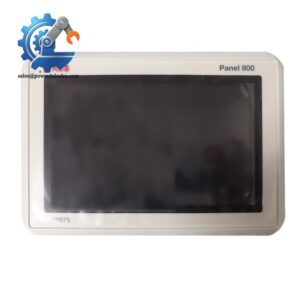
- Type: Front HMI Operator Panel
- Key Specs: Backlit graphical LCD, dedicated navigation keys, front service port, support four transfer logic modes
- Condition: New Original, non-refurbished
- Stock Reminder: Limited available inventory
Product Introduction
When auxiliary power systems inside power plants lose main incoming supply, fast bus transfer directly decides whether critical rotating loads keep running. The ABB SUE3000 1VCR007346 G0032 serves as the local man-machine interface matched to the SUE3000 high speed transfer device. Mounted on medium voltage switchgear doors, it lets field technicians complete commissioning and troubleshooting without remote SCADA access.
Unlike general-purpose HMIs, this panel runs dedicated firmware pre-configured for motor bus transfer workflows. It displays single-line diagrams, bus voltage measurements, breaker positions, synchronism status and historical disturbance records. Four sets of transfer logic can be activated and adjusted locally. Built-in multi-color LED annunciators give instant warning for interlock, fault and ready status. Field feedback shows it shortens routine parameter checking time significantly compared with terminal-based debugging.
Key Technical Specifications
表格
| Parameter Item | Technical Value |
|---|---|
| Full Part Number | SUE3000 1VCR007346 G0032 |
| Applicable System | ABB SUE3000 High Speed Transfer Device (HSTD) |
| Display Module | Backlit graphical monochrome LCD |
| Operation Elements | Rotary selector + dedicated function pushbuttons |
| Status Indicators | Ready, BB Error, Alarm, Interlocking LED indicators |
| Front Interface | Isolated RS232 service port for laptop commissioning |
| Backplane Communication | RS485 bus connection to main SUE3000 control unit |
| Supported Communication Protocols | IEC 61850, IEC 60870-5-103, SPA Bus, Modbus RTU |
| Operating Supply Voltage | 48 – 265 VDC |
| Installation Form | Flush panel mounting for MV switchgear cutout |
| Operating Ambient Temperature | -10 °C to +55 °C |
| Net Weight | 0.95 kg |
| Typical Application | Power station auxiliary power, large industrial medium voltage substations |
Installation & Configuration Guide
Stage 1: Pre-Installation Preparation (10 Minutes)
⚠️ Safety Priority Inform control room operators and mark the affected bus zone. Trip relevant circuit breakers and verify zero live voltage inside the cabinet. Cut power supply to the whole SUE3000 system, wait 3 minutes for internal capacitors to discharge fully.
Tool Preparation ESD anti-static wristband, PH1 screwdriver, digital multimeter, mobile phone for configuration photo backup, insulating gloves.
Backup Work Export all transfer mode settings, protection thresholds and breaker interlock logic via commissioning software. Take clear photos of rear wiring terminals and any handwritten parameter labels on the old panel.
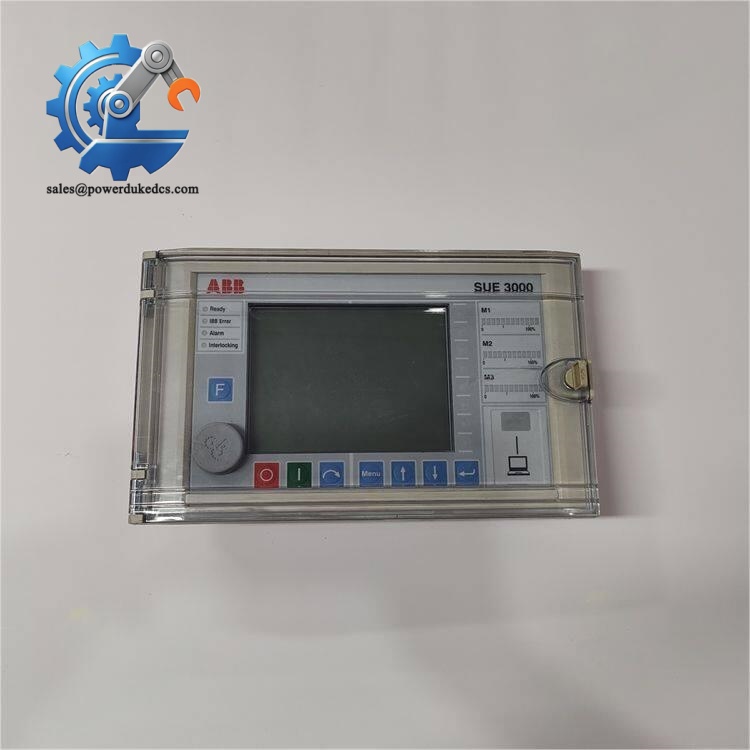
ABB SUE3000 1VCR007346 G0032
Stage 2: Old Panel Removal (12 Minutes)
- Lift the transparent protective cover on the panel front.
- Label every power and communication wire before loosening terminal screws.
- Remove four mounting bolts around the switchgear cutout, then take out the unit slowly.
- Unplug the rear connector vertically. Never pull cables hard to avoid pin damage.
- Check cabinet cutout edges; file sharp burrs which may scratch the new panel housing.
⚠️ Note: Keep all configuration notes attached to the original panel; these on-site tuning parameters cannot be restored automatically.
Stage 3: New Panel Installation (15 Minutes)
- Wear anti-static wristband before unpacking SUE3000 1VCR007346 G0032. Double-check complete part number match.
- Route rear cables through the cabinet opening and plug firmly into the panel rear connector.
- Fasten four mounting bolts symmetrically; avoid over-tightening to prevent housing deformation.
- Reconnect power and communication wires strictly following photographed wiring layout.
- Adjust terminal torque and lightly tug each wire to confirm stable connection.
Self-Check List [ ] All wiring matches original layout [ ] No loose terminal connections [ ] Panel installed horizontally without tilt [ ] Transparent protective cover closes freely
Stage 4: Power-On & Functional Testing (25 Minutes)
Use multimeter to confirm DC supply falls inside 48–265 VDC range before restoring power.
- Observe boot procedure: Ready LED should light after initialization finishes.
- Connect laptop to front RS232 port and establish communication with HMI.
- Compare firmware revision against the replaced panel.
- Upload saved configuration file and verify all four transfer modes are selectable.
- Trigger simulated alarm signals and check LED annunciator response speed.
- Navigate menu pages to confirm voltage measurement, breaker status and fault record storage work normally.
- Maintain continuous operation observation for minimum 30 minutes, watch for random communication dropouts or screen freezing.
- Record new panel serial number and commissioning time inside equipment maintenance logs.
Strict Quality Inspection Process
1. Warehouse Receiving Verification
Every incoming unit goes through source document cross-check. We validate serial numbers against ABB factory records and inspect anti-counterfeit marks. Complete visual inspection confirms no scratches, cracks or disassembly traces. Original packaging, operation manual and factory test certificate will be verified as full sets.
2. Live Functional Testing
All panels run full tests on a matched SUE3000 main unit test bench. Execute power-on startup test, verify LCD display and all keypad responses. Build RS485 communication link to validate bidirectional data exchange with main control hardware. Simulate multiple interlock and alarm conditions to test LED indication logic. Continuous 24-hour aging test monitors screen stability and communication continuity. Formal test reports can be issued on customer request.
3. Electrical Parameter Detection
Carry out 500V insulation resistance test, all measured results stay higher than 10 MΩ. Check power circuit polarity to eliminate short-circuit risks. Verify communication port isolation performance, reducing ground loop interference risks inside medium voltage switchgear environments.
4. Firmware & Menu Verification
Read and record factory firmware version for each unit. Confirm menu structure aligns with standard SUE3000 operation workflows. We support firmware adjustment if customer site systems require specific software revisions.
5. Final QC & Packaging
Qualified units are sealed inside anti-static bag after inspector confirmation. Wrap with bubble film and pack into reinforced cartons. Each package carries a QC Pass sticker printed with inspection date. Customers can apply for test photos or operation short videos before shipment.
On-Site Replacement Pitfall Guide
1. Firmware Version Mismatch
Different firmware revisions lead to menu incompatibility and failure to read historical disturbance records. One site case: engineers completed direct swap without checking version, and spent two days recovering event log access. Avoidance: Record firmware version from the old panel before disassembly. Confirm version consistency when ordering spare units.
2. RS485 Bus Termination Switch Misconfiguration
SUE3000 communication bus only allows 120Ω termination resistors installed at two network endpoints. Wrong settings cause unstable data refresh and flickering measured values on screen. Avoidance: Take clear photos of termination switch positions. Replicate all settings one-to-one on new hardware.
3. DC Power Polarity Reversal
This HMI panel has limited built-in reverse connection protection. Incorrect wiring can permanently damage internal circuit boards instantly after power-up. Avoidance: Measure voltage polarity with multimeter before connecting power cables. Do not judge polarity only by wire color.
4. ESD Damage During Installation
Dry air inside switchgear cabinets increases static risks in winter. Static discharge can burn out LCD driver chips once the housing is opened. Avoidance: Mandatory anti-static wristband for all disassembly and installation work. Do not touch rear circuit board components directly.
5. Uneven Mechanical Mounting Stress
Asymmetric bolt tightening creates long-term housing distortion. After months of operation, the LCD screen develops light leakage or dead pixel faults. Avoidance: Tighten four mounting bolts alternately and symmetrically. Do not apply excessive torque.
Frequently Asked Questions (FAQ)
1. Can SUE3000 1VCR007346 G0032 perform plug-and-play direct replacement? Physical mounting supports direct swap. But seamless operation depends on matching firmware version and imported parameter set. If firmware differs, partial menu functions may become inaccessible.
2. What warranty terms apply for this panel? We provide 12-month warranty for new original units. Failures caused by non-human damage qualify for after-sales support. All test records are filed for quality traceability.
3. Can this HMI run independently without the SUE3000 main control unit? No. This unit is only the local operation display. It cannot execute bus transfer logic alone and requires RS485 connection to the main SUE3000 controller.
4. Can I receive inspection documents before delivery? Yes. We can supply QC inspection photos, electrical test records and short operation videos for customer confirmation before shipment. These materials support factory incoming inspection procedures.
5. Which sites commonly deploy the SUE3000 system? Mainly power station auxiliary power supply systems, large chemical medium voltage substations and metallurgical plant switchgear rooms. The device prevents critical load power loss through rapid bus transfer.
6. What lead time applies for stocked panels? We hold limited spot inventory. Confirmed orders can be arranged for shipment within 1–2 working days. Express delivery options are available to shorten equipment downtime.
If you need me to shorten paragraphs for 1688 product listing or extract pure copy without section headings, tell me directly.



 Start Chat


