

Description
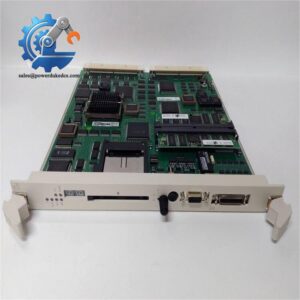
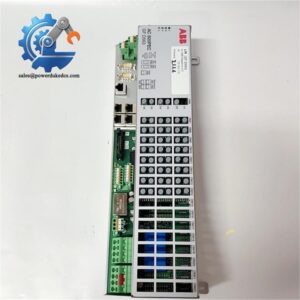
ABB XUD194 3BHE018137R0001 AC800PEC Product Page
Product Core Brief
-
Model: XUD194 3BHE018137R0001
-
Brand: ABB
-
Series: AC800PEC Programmable Automation Controller Series
-
Core Function: Executes high-speed real-time process control for industrial DCS and automation systems
-
Type: Programmable Automation Controller (PAC) Module
-
Key Specs: 2 GB DDR4 RAM, 8 GB Flash storage, SIL 3 safety certification, hot standby redundancy support
-
Condition: New Original, non-refurbished, factory sealed
-
Stock Status: In stock, fast global shipment available
Product Introduction
For plant maintenance and automation engineers managing high-reliability industrial control systems, the ABB XUD194 3BHE018137R0001 stands as a core control unit for AC800PEC platforms. It serves heavy industrial scenarios that demand stable real-time operation, covering power generation, chemical processing and manufacturing automation fields. This module acts as the central computing and control hub for distributed control systems.
Different from conventional general-purpose PLC modules, this PAC module features industrial-grade hardware configuration and redundant design. Equipped with 2 GB DDR4 high-speed memory and 8 GB large-capacity flash storage, it handles complex control logic and massive field data stably. It passes strict SIL 3 safety certification per IEC 61508 standards, effectively reducing system failure risks. Its built-in anti-interference structure ensures continuous operation in harsh electromagnetic and temperature-variable industrial environments. Field data shows its optimized program scanning cycle cuts down system response delay significantly compared with basic control modules.
Key Technical Specifications
|
Parameter Item
|
Technical Value
|
|---|---|
|
Full Model Number
|
XUD194 3BHE018137R0001
|
|
Product Series
|
ABB AC800PEC PAC System
|
|
Memory Configuration
|
2 GB DDR4 RAM, 8 GB Flash Storage
|
|
Safety Certification
|
SIL 3 (Compliant with IEC 61508 / IEC 61511)
|
|
Redundancy Function
|
Hot standby CPU, redundant power and communication support
|
|
Supported Protocols
|
Ethernet, Fieldbus, Serial communication protocols
|
|
Operating Temperature
|
-20°C to +60°C (industrial standard range)
|
|
Cooling Mode
|
Natural air cooling, no auxiliary fan required
|
|
Mounting Type
|
Standard DIN rail rack mounting
|
|
System Compatibility
|
Fully compatible with AC800PEC full-series control systems
|
|
Anti-Interference Grade
|
Industrial EMC anti-electromagnetic interference design
|
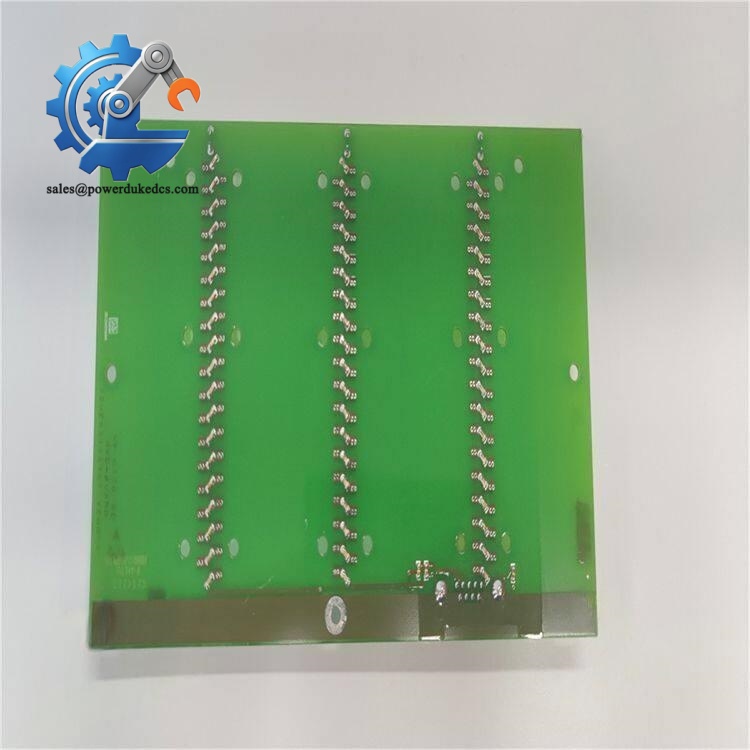
ABB XUD194 3BHE018137R0001
Installation & Configuration Guide
Stage 1: Pre-Installation Preparation (10 Minutes)
⚠️ Safety Priority
Notify production teams of scheduled downtime and switch the entire control system to a safe standby state. Close all controlled valves and stop running motors to avoid accidental startup. Cut off both main power and UPS power supply for the control cabinet, then wait 5 minutes for internal capacitors to fully discharge.
Tool Preparation
Prepare ESD anti-static wristband and anti-static mat, PH1 cross screwdriver, Fluke 115 multimeter, label markers and a mobile phone for configuration recording.
Data Backup Work
Export the complete running program of the existing system to USB flash drive and cloud storage. Take clear photos of DIP switch positions, terminal wiring layout and overall rack arrangement for subsequent configuration replication.
Stage 2: Old Module Removal (15 Minutes)
First, remove the module front cover by pressing the side buckles gently. Mark each cable terminal number with labels before disconnection to avoid wiring confusion. Loosen terminal screws counterclockwise and pull out cables steadily without violent dragging.
Press down the DIN rail buckle at the module bottom with a flat screwdriver, then pull the old module vertically outward to separate it from the backplane connector. Check backplane pins for bending, oxidation or dust; clean residual dust with compressed air if needed. Do not touch backplane pins directly by hand.
Save all configuration labels on the old module before removal. These handwritten parameter records are critical for on-site configuration restoration.
Stage 3: New Module Installation (15 Minutes)
Wear anti-static wristband strictly before taking the new ABB XUD194 module out of the anti-static bag. Double-check the full model 3BHE018137R0001 to confirm consistency with the replaced unit.
Replicate the original configuration fully according to reserved photos. Adjust node address, baud rate and bus termination resistor status to match on-site system settings. Remember 120Ω termination resistors only apply to the two ends of the entire bus network.
Align the module with the backplane connector, insert it vertically and press firmly until a click sound confirms full locking. Restore all cables one by one per labeled records, tighten terminal screws with moderate torque (about 0.5 N·m) and pull cables slightly to verify firm connection.
Self-Check List
DIP switch settings correct, all cables connected securely, terminal screws tightened, module buckle locked, no tools left inside the cabinet.
Stage 4: Power-On & Functional Testing (30 Minutes)
Test the cabinet input voltage with a multimeter to confirm 24V DC ±10% and no short circuit between power and ground terminals. Power on the control rack alone first, observe module LED indicators: steady green RUN light means normal startup; flashing red ERR light indicates abnormal startup requiring fault code checking.
Connect Control Builder programming software to scan network devices, confirm the new module is online and read the firmware version for record. Download the pre-backed up system program and switch the module to RUN mode after successful compilation and download.
Simulate multiple I/O signal triggers and check communication connection status with HMI and SCADA systems. Run the system continuously for more than 30 minutes, confirm no system alarms and stable operating parameters. Record module replacement time, operator information and new serial number in the equipment maintenance log.
Strict Quality Inspection Process
1. Warehouse Receiving Verification
We verify original factory packing lists and customs declaration documents for every ABB XUD194 module to trace product source. Check official serial numbers via ABB system and inspect anti-counterfeit labels completely. Conduct full appearance inspection to ensure no scratches, corrosion, yellowing or disassembly traces. Complete accessory verification including original manuals, warranty cards and factory certificates.
2. Live Functional Testing
All modules undergo full tests on original ABB AC800PEC test racks. Complete power-on self-test to check LED indicator working status and startup stability. Conduct multi-protocol communication handshake tests including Ethernet and fieldbus. Perform full-range analog and digital I/O signal simulation tests. Implement 24-hour continuous load operation to monitor module temperature rise and operating stability, and generate formal test reports for each unit.
3. Electrical Parameter Detection
Carry out 500V megger insulation resistance test, with all tested data above 10 MΩ. Complete ground continuity test and standard pressure resistance test to eliminate electrical hidden dangers. All electrical test data is recorded and filed for customer inquiry.
4. Firmware & Configuration Verification
Read and record the factory firmware version of each module uniformly. Back up default DIP switch and jumper configuration photos. We can refresh or downgrade firmware according to customer on-site system version requirements to ensure system compatibility.
5. Final QC & Packaging
Professional QC personnel confirm all test items pass and sign for confirmation. The module is sealed in an anti-static bag, wrapped with bubble film and packed in a thick carton. Each package is pasted with a QC Pass label with inspection date. Test videos and photos can be provided to customers upon request.
On-Site Replacement Pitfall Guide
1. Firmware Version Mismatch Risk
Firmware version differences will cause communication timeout and protocol mismatch errors between the new module and existing AC800PEC systems. Many on-site engineers only check the model number and ignore firmware versions, leading to 1-2 days of system debugging delays.
Avoidance Method: Record the original module firmware version before replacement. Confirm the acceptable firmware range with suppliers in advance. We support targeted firmware brushing and downgrading to match your existing system.
2. Incorrect DIP Switch & Jumper Configuration
This is the most frequent on-site error. Factory default node addresses and baud rates often do not match field settings, causing network failure after power-on.
Avoidance Method: Take high-definition photos of the old module’s switch positions before disassembly. Copy all configurations one-to-one before powering on the new module. Never rely on experience to set parameters arbitrarily.
3. Power Load Margin Insufficiency
The XUD194 module matches high-load AC800PEC systems. Multiple peripheral I/O modules will increase overall rack power consumption. Original power supply units may lack load margin and trigger undervoltage alarms.
Avoidance Method: Calculate total rack power consumption before replacement, reserve more than 20% power margin. Replace or add power modules if the load approaches the upper limit.
4. ESD Static Damage
PAC modules feature precision internal circuits, which are extremely vulnerable to static breakdown in dry winter environments. We have encountered cases where modules burned out directly after power-on due to operation without anti-static measures.
Avoidance Method: All disassembly and installation operations must be completed on anti-static mats with anti-static wristbands worn. Do not touch circuit boards and pin areas directly.
5. Terminal Wiring Definition Deviation
Even with consistent model numbers, individual batch modules have slight differences in partial terminal pin definitions. Blind wiring by experience easily causes signal abnormality and short circuit faults.
Avoidance Method: Check the official ABB wiring diagram before wiring. Compare terminal definitions one by one. Standardize shield grounding modes to avoid signal interference caused by inconsistent single-ended and double-ended grounding.
Frequently Asked Questions (FAQ)
1. Is the ABB XUD194 3BHE018137R0001 fully plug-and-play for old AC800PEC systems?
It supports direct physical replacement. But plug-and-play effect depends on firmware matching. If your on-site system runs old firmware versions, you need to adjust the new module firmware to match the system protocol to avoid communication failures.
2. What is the warranty policy for this module?
We provide 12-month official warranty for all new original XUD194 modules. Non-human damage failures within the warranty period support free replacement and technical after-sales service. We retain complete test records for each module to guarantee product quality.
3. Does this module support hot standby redundancy operation?
Yes. This AC800PEC PAC module is designed with redundant architecture, supporting hot standby CPU, redundant power supply and redundant communication operation. It ensures uninterrupted system switching and zero data loss during single module failure, suitable for high-reliability industrial scenarios.
4. Can I get test reports and inspection documents before delivery?
Absolutely. We can provide official factory test reports, electrical parameter detection data and QC inspection photos/videos for each module before shipment. All documents support customer factory incoming inspection verification.
5. What industrial scenarios is XUD194 suitable for?
It adapts to medium and large industrial automation scenarios requiring high safety and stability, including power plant control, chemical process monitoring, manufacturing DCS systems and other fields. Its SIL 3 certification makes it applicable for safety-critical control loops.
6. How long is the delivery cycle for in-stock units?
We have sufficient spot inventory of XUD194 3BHE018137R0001. Orders can be shipped within 1-2 working days. We support fast air freight to shorten customer standby time and reduce production downtime losses.



 Start Chat


