

Description
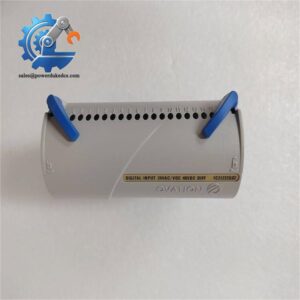
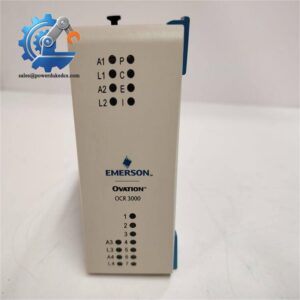
- Emerson KJ2221X1-BA1 | Safety-Critical Network Repeater for Oil & Gas Process Plants
Product Core Brief
- Model: KJ2221X1-BA1
- Brand: Emerson
- Series: DeltaV SIS System
- Core Function: Regenerate and extend SISNet communication signals for safety instrumented networks
- Type: SISNet Repeater Module
- Key Specs: 24 V DC power supply; SISNet proprietary communication; Built-in network diagnostic LED indicators Condition: New Surplus, not refurbished ⚠️ This component has reached OEM end-of-production, available inventory is limited.
Product Introduction
Network signal attenuation over long cable runs creates hidden communication risks for safety interlock systems. The Emerson KJ2221X1-BA1 acts as dedicated signal repeater built exclusively for DeltaV SIS safety networks.
This module reshapes and buffers SISNet differential signals to expand the maximum transmission distance between SIS logic solvers and field equipment. It isolates network segments to suppress electrical noise interference common inside chemical and power plant cabinets. Every communication frame follows DeltaV safety protocol rules, ensuring safety-related data cannot be corrupted during forwarding. Field records show this repeater effectively reduces random communication timeout alarms caused by long wiring layouts.
Key Technical Specifications
| Parameter | Details |
|---|---|
| Full Part Number | KJ2221X1-BA1, Alternative ID:12P3232X112 |
| Platform Compatibility | Emerson DeltaV SIS Safety Instrumented System |
| Module Type | SISNet Communication Repeater |
| Power Input | 24 V DC, Max 300 mA |
| Communication Interface | SISNet differential bus |
| Operating Temperature | -40 °C ~ +70 °C |
| Mounting Method | DIN rail installation inside control cabinet |
| Onboard Indicators | Power, Link, Fault diagnostic LED lights |
| Functional Feature | Electrical isolation between two network segments |
| Application Scenarios | Chemical plant, refinery, power station safety interlock control |
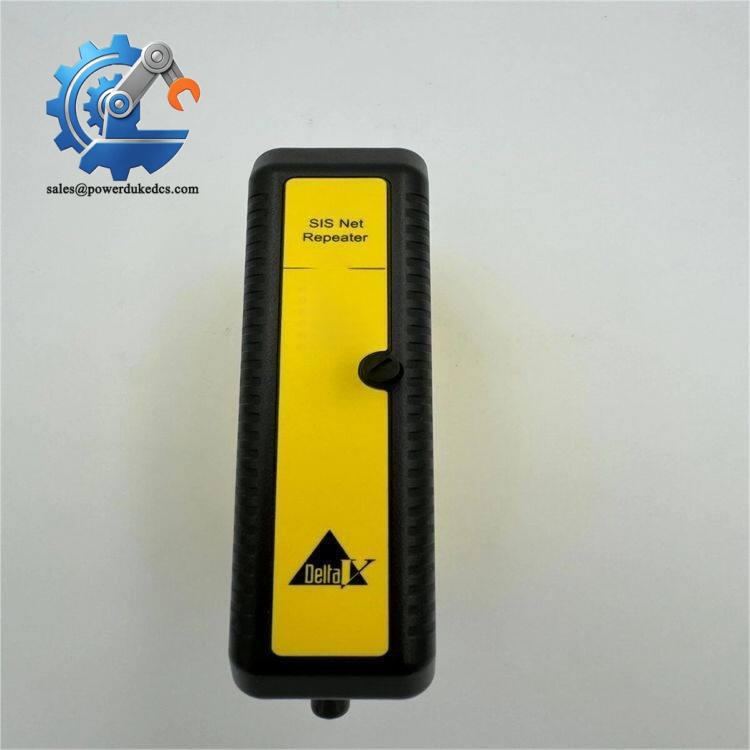
Emerson KJ2221X1-BA1
Installation & Configuration Guide
Phase 1: Pre-Installation (Estimated: 12 minutes)
⚠️ Safety Reminders
- Coordinate process team to lock relevant safety loops during maintenance.
- Confirm scheduled shutdown window; unexpected network interruption may trigger safety trips.
- Prepare ESD protection tools to prevent static damage to circuit boards.
Tools to prepare
- Anti-static wrist strap and anti-static mat
- PH1 cross screwdriver
- Digital multimeter
- Mobile phone for wiring photo recording
- Shielded twisted pair cable matching SISNet specification
Backup work
- Record existing SIS network topology, segment layout and cable routing.
- Capture photos of original repeater wiring terminal definitions.
Phase 2: Remove Old Repeater Module (Estimated: 10 minutes)
- Mark all communication wires before disconnection.
- Unplug SISNet incoming and outgoing shielded cables one by one.
- Loosen DIN rail mounting clip and detach the module.
- Check cable terminal pins for oxidation or bending. Clean connectors if dust accumulates.
⚠️ Do not pull cables hard. Damaged twisted pairs introduce high communication error rates.
Phase 3: Install New Module (Estimated: 16 minutes)
- Wear anti-static wrist strap before removing the unit from anti-static packaging.
- Double-check part number to confirm KJ2221X1-BA1 matches replacement requirement.
- Snap the module firmly onto DIN rail, ensure no horizontal wobble.
- Connect inbound and outbound SISNet cables strictly following photo records. Terminate cable shield ground at single end.
Self-check checklist [ ] Part number verified [ ] Inbound / outbound network wiring not reversed [ ] Module locked securely on DIN rail [ ] No loose wiring terminals
Phase 4: Power-On & Functional Test (Estimated: 28 minutes)
Pre-power inspection
- Measure 24 V DC input voltage to eliminate overvoltage risk.
- Confirm no short circuit between power terminals.
Power-on steps
- Restore power supply to the repeater module.
- Observe LED indicators: steady green Link light indicates normal bus connection.
- Connect DeltaV configuration workstation, scan SIS network and verify all nodes remain online.
- Run continuous network diagnosis for 30 minutes, watch for packet loss or intermittent faults.
- Check safety logic solver status; confirm no spurious communication alarms generated.
Troubleshooting hints
- All Link LEDs off: Verify 24 V power supply and wiring polarity.
- Intermittent communication dropout: Check cable shielding and separate SIS wiring from high-voltage power cables.
- Fault LED flashing: Confirm network topology, avoid forming closed signal loops.
Frequently Asked Questions (FAQ)
- Can I hot-swap KJ2221X1-BA1 without shutting down the SIS network? Hot swap is not advised. Removing the repeater cuts off communication between two SIS network segments, which can trigger safety interlock trips. Complete replacement during planned maintenance shutdown.
- Does KJ2221X1-BA1 work with all generations of DeltaV SIS logic solvers? Compatibility depends on SIS system firmware version. We have encountered cases where older logic solver firmware fails to recognize newer repeater hardware. Send your system firmware revision before purchase for confirmation.
- What testing procedures do you carry out before shipment? Each unit undergoes power-on aging testing, SISNet communication simulation and LED function verification. We can provide test screenshots; short testing video records can be delivered on request. All stock items carry a 12-month warranty.
- Can multiple KJ2221X1-BA1 modules be cascaded in one SIS bus? Cascading is allowed, but excessive repeaters increase signal latency. Follow Emerson official guidelines for maximum cascade quantity to avoid safety scan cycle timeout.
- What is the typical delivery lead time? Units stocked in Xiamen warehouse can be shipped within 1–3 working days. If local stock runs out, last-time component sourcing can be arranged; exact lead time will be notified before formal order confirmation.
- What faults commonly appear on aging SISNet repeaters? Gradual signal attenuation, random Link LED flickering and periodic communication timeout alarms are typical failure signs. Most failures stem from internal transceiver circuit aging after long-term operation under high electromagnetic interference.



 Start Chat


