

Description
- Concurrent SSI232.1 029.365.083 | Position Sensor Interface Card for Automation Test Systems
Product Core Brief
- Model: SSI232.1 029.365.083
- Brand: Concurrent
- Series: CompactPCI Industrial Interface Boards
- Core Function: Process synchronous SSI encoder signals and asynchronous RS232 serial data
- Type: CompactPCI communication interface card
- Key Specs: Multi-channel SSI input, configurable RS232 ports, 3U CompactPCI form factor
- Condition: New Surplus, fully bench tested before shipment ⚠️ Original product discontinued, limited available inventory
Product Introduction
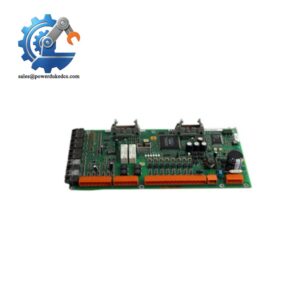
Many legacy real-time control racks rely on dedicated interface hardware to read absolute encoders and communicate with serial field instruments. The SSI232.1 029.365.083 fits this exact role as a 3U CompactPCI board. It acts as a signal bridge between the backplane bus, SSI position encoders and RS232 serial devices.
Onboard logic handles synchronous clock and data transmission for SSI encoders without heavy CPU loading. It supports standard SSI frame formats and adjustable clock rates. Field experience shows stable performance in motion control and machinery test platforms. Compared with generic serial adapters, this hardware carries dedicated timing circuits to avoid position jitter during high-speed sampling.
Key Technical Specifications
| Parameter | Details |
|---|---|
| Full Part Number | SSI232.1 029.365.083 |
| Form Factor | 3U CompactPCI (CPCI) Card |
| Interfaces | Multi-channel SSI synchronous input, RS232 asynchronous serial ports |
| SSI Supported Modes | Standard synchronous SSI encoder protocol, adjustable clock frequency |
| RS232 Max Baud Rate | Up to 115200 bps, software configurable |
| Operating Temperature | -20 °C ~ +70 °C |
| Storage Temperature | -40 °C ~ +85 °C |
| Humidity Range | 5% ~ 95 %, non-condensing |
| Backplane Interface | CompactPCI standard J1/J2 connector |
| Application Scenarios | Motion control systems, test benches, position monitoring, industrial real-time simulation |
| Signal Isolation | Partial channel isolation for noise suppression |
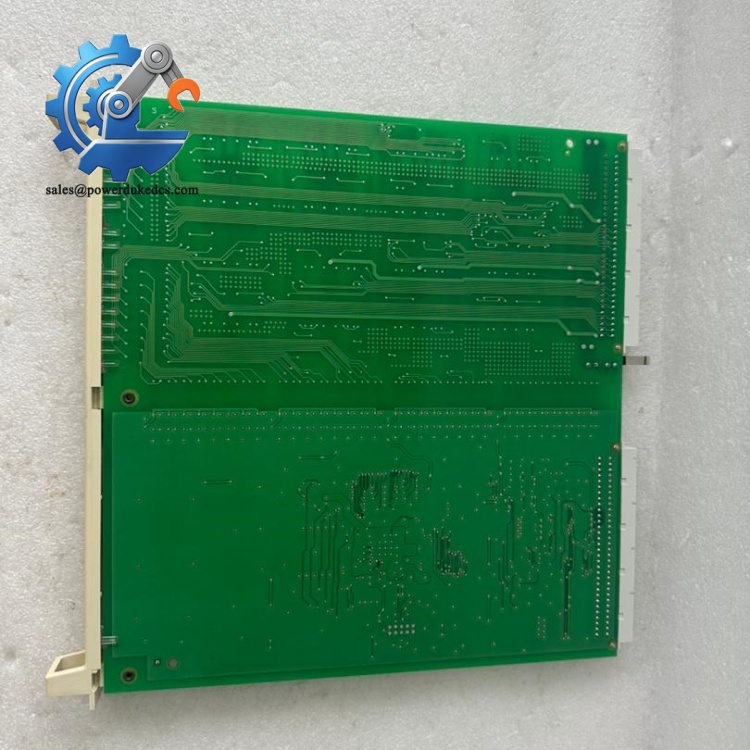
Concurrent SSI232.1 029.365.083
Installation & Configuration Guide
Phase 1: Pre-Installation (Estimated 10 minutes)
⚠️ Safety Reminders:
- Coordinate maintenance window with operation team, confirm planned system shutdown.
- Power down the CompactPCI rack and wait 5 minutes for internal capacitors to discharge.
- ESD protection is mandatory during all handling of this circuit board.
Tools you need:
- Anti-static wrist strap + anti-static mat
- Phillips screwdriver
- Mobile phone for photo recording of wiring and slot layout
- Serial communication tester for post-install verification
Backup work:
- Export system configuration file for the control host.
- Photograph the slot position and cable routing of the original board.
Phase 2: Remove Original Module (Estimated 12 minutes)
- Unplug all external SSI and RS232 cables connected to the front panel connectors.
- Loosen the two captive screws on the board front plate.
- Pull the board straight out from the CompactPCI slot. Do not twist the card to prevent bending backplane pins.
- Inspect the gold edge connectors; remove dust with dry compressed air. Do not touch contact surfaces directly.
Note: Keep the original wiring labels for quick reconnection.
Phase 3: Install New SSI232.1 029.365.083 (Estimated 10 minutes)
- Wear anti-static gear before opening anti-static packaging.
- Verify full part number: SSI232.1 029.365.083. Wrong variants cannot match existing driver configuration.
- Align the card with the target CompactPCI slot, push horizontally until fully seated against the backplane.
- Tighten front panel captive screws evenly; avoid over-torque.
- Restore external SSI encoder cables and RS232 serial wiring according to photos.
Pre-power checklist: [ ] Board fully inserted into assigned CPCI slot [ ] No bent pins on backplane connector [ ] All external cables securely connected [ ] No loose metal scraps inside the rack
Phase 4: Power-On & Function Test (Estimated 20 minutes)
Pre-power inspection: Visually confirm no short circuits on external wiring terminals.
Power-up sequence:
- Energize the CompactPCI rack.
- Boot the real-time host operating system.
- Load dedicated device driver for the SSI232.1 board.
- Scan hardware bus to confirm the system detects the new interface card.
- Read position values from SSI encoders, check stable position feedback without random jumps.
- Send and receive test data via RS232 channels to verify serial communication.
- Maintain continuous running for over 30 minutes. Monitor signal stability and temperature drift.
Troubleshooting hints:
- Board not detected → Check slot seating and backplane contact cleanliness
- No valid SSI position data → Verify clock polarity and cable shielding
- RS232 communication failure → Match baud rate, parity and stop bit settings
Frequently Asked Questions (FAQ)
- Can I hot swap this CompactPCI board while the rack remains powered? Hot swap is not supported for this hardware. You must shut down the host and cut rack power before replacement. Live removal risks damaging the backplane and encoder sensors.
- Does the SSI232.1 work with all types of SSI absolute encoders? It supports standard SSI protocol encoders. Some proprietary extended SSI formats may require parameter adjustment in the driver software. Confirm encoder frame length before commissioning.
- Will direct replacement require driver reconfiguration? If you use the exact same part number, existing driver setup can normally be reused. We recommend recording original register parameters before replacement to avoid position offset errors.
- Can I mix multiple SSI encoder brands on different channels of this card? Yes. Each channel runs independently. Just configure individual frame parameters for every connected encoder.
- What causes unstable flickering position readings from SSI channels? Poor cable shielding, excessive cable length or incorrect clock frequency are common causes. Route SSI cables away from high-power variable frequency drive wiring.
- Is this card compatible with all generations of CompactPCI racks? It follows standard 3U CompactPCI specification. Early legacy racks with revised backplane pin definitions may have compatibility risks. Cross-check rack hardware revision before ordering.
- What warranty do you provide for this spare interface board? We offer 12-month warranty after shipment. Every unit undergoes full hardware bench testing. Test photos or logs can be provided upon request.



 Start Chat


