

Description
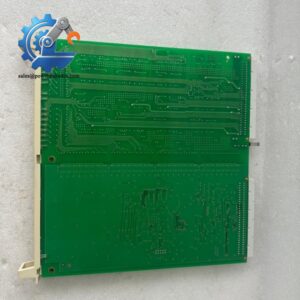
- CCC MCP-1004 | XCALIBER Series CPU Board, Supports Real-Time Anti-Surge Algorithm Execution
Product Core Brief
- Model: MCP-1004
- Brand: CCC (Compressor Controls Corporation)
- Series: XCALIBER 1000 Control Platform
- Core Function: Run real-time anti-surge, load sharing and turbine/compressor sequence control logic
- Type: Main Processor CPU Module
- Key Specs: 1 GHz RISC processor; Onboard Ethernet interface; Compact CPCI rack form factor Condition: New Surplus, not refurbished ⚠️ OEM active platform spare part; inventory quantity limited.
Product Introduction
Unplanned trips of centrifugal compressors triggered by CPU failure create heavy production losses for refinery and LNG facilities. The CCC MCP-1004 serves as the core computing unit inside the XCALIBER 1000 control rack.
Unlike general-purpose PLC CPUs, this hardware is optimized exclusively for turbomachinery closed-loop algorithms. It delivers consistent low scan intervals to execute anti-surge protection and load balancing control. Field data shows stable continuous operation over 55,000 hours under typical plant ambient conditions. The onboard Ethernet port enables direct communication with plant DCS systems for data exchange and remote configuration download.
Key Technical Specifications
| Parameter | Details |
|---|---|
| Full Part Number | MCP-1004 |
| Processor | 1 GHz RISC CPU |
| Form Factor | CPCI rack slot module |
| Onboard Interface | RJ45 Ethernet, CompactFlash storage slot |
| Supported Software | CCC Toolbox Configuration Software |
| Typical Power Consumption | 9.2 W |
| Operating Temperature | -20 °C ~ +65 °C |
| Humidity Range | 5% ~ 95%, non-condensing |
| Core Control Tasks | Anti-surge control, compressor sequencing, load sharing, speed regulation |
| System Matching | XCALIBER 1000 rack I/O modules |
| Module Weight | 0.86 kg |
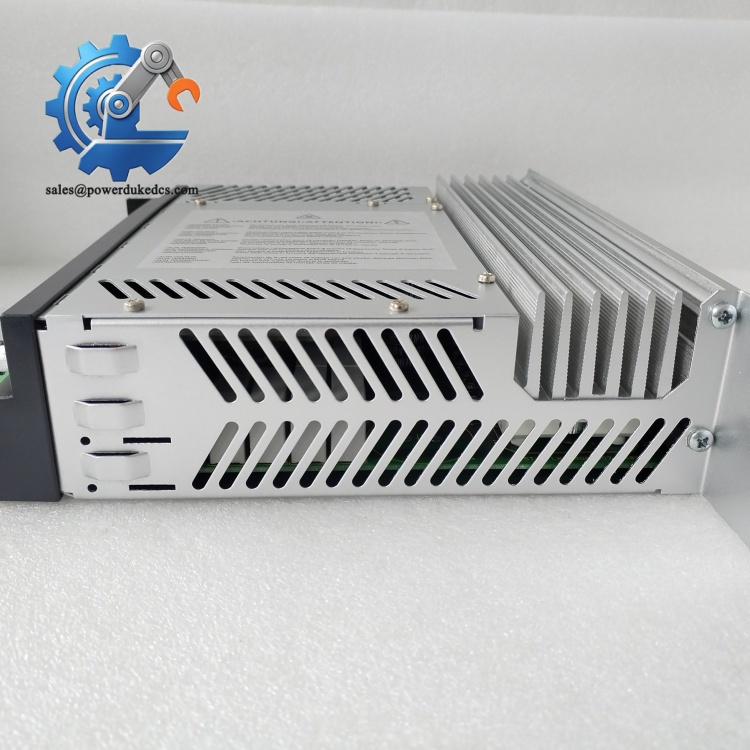
CCC MCP-1004
Installation & Configuration Guide
Phase 1: Pre-Installation (Estimated 12 min)
⚠️ Safety Reminders
- Coordinate shutdown window with operation teams. CPU replacement stops all compressor control protection.
- Disconnect rack power and wait minimum 5 minutes for internal capacitor discharge.
Tools required
- Anti-static wrist strap and anti-static mat
- PH1 screwdriver
- Digital multimeter
- Mobile phone for photo recording
Backup work
- Export full compressor control project file and save multiple offline copies.
- Capture clear photos: slot position, module front panel label, existing network parameters.
- Record CompactFlash program version loaded on the original processor.
Phase 2: Old Module Removal (Estimated 15 min)
- Confirm rack power remains disconnected. Static discharge can permanently damage CPU circuits.
- Remove Ethernet cable from front RJ45 port and mark cable clearly.
- Unlock front panel ejector levers, pull the CPU module straight outward. Do not twist during extraction.
- Inspect rack backplane connectors for bent pins, dust or corrosion. Clean with dry compressed air if needed.
- Remove the CompactFlash memory card from the old unit for program migration.
⚠️ Do not touch circuit board traces or memory contacts with bare fingers.
Phase 3: New Module Installation (Estimated 15 min)
- Wear anti-static gear before unpacking the module from ESD shielding packaging.
- Verify part number: MCP-1004.
- Insert the stored CompactFlash card with backup control program into the new CPU slot.
- Align module with CPCI rack guides, push fully inward and lock ejector levers firmly.
- Reconnect Ethernet cable following recorded wiring information.
Self-check list [ ] Module fully seated and locked in rack slot [ ] CompactFlash card properly inserted [ ] Network cable securely plugged [ ] No loose debris left inside rack frame
Phase 4: Power-On & Commissioning (Estimated 35 min)
Pre-power inspection
- Measure rack supply voltage to confirm 24 V DC within tolerance range.
- Confirm no short-circuit conditions on power terminals.
Power-on steps
- Energize XCALIBER rack only. Keep compressor offline during commissioning.
- Observe front panel LED indicators: steady RUN light indicates normal boot sequence. Flashing FAULT LED signals loading errors.
- Connect PC running CCC Toolbox software, establish Ethernet connection with the new CPU.
- Verify control program loads successfully; check all configured I/O tags and anti-surge parameters.
- Perform offline simulation of startup sequence and anti-surge response logic.
- Maintain continuous rack monitoring for minimum 30 minutes without persistent faults.
- Record serial number, replacement date and program revision into equipment maintenance logs.
Troubleshooting tips
- CPU fails boot: Check CompactFlash seating and confirm program file compatibility.
- No Ethernet communication: Verify static IP settings and cable continuity.
- Persistent algorithm faults: Compare parameter sets with original project backup.
Frequently Asked Questions (FAQ)
- Can MCP-1004 directly replace older processor versions on XCALIBER racks? Hardware slot fit is identical, but firmware and project compatibility must be verified. Some legacy program files require conversion via CCC Toolbox before download. Direct swap without parameter validation may trigger control loop trips.
- Does the support hot-swap operation? The rack mechanically allows hot removal. All compressor control and anti-surge protection will be lost immediately. Always execute replacement during scheduled unit shutdown.
- Can multiple CPU modules run within one single XCALIBER rack? Standard configuration supports one main processor per rack. Redundant CPU architecture requires specific rack backplane and license options; confirm system design before ordering spare parts.
- What type of CompactFlash card works with this module? Standard industrial-grade CompactFlash media. High-capacity modern CF cards may not boot properly. Match the storage size used on your original processor.
- What warranty coverage is offered for CCC ? All units complete bench boot testing and communication verification before shipment. We provide a 12-month warranty. Test photos and inspection records can be provided upon request.
- Can this CPU communicate directly with third-party DCS systems? Communication relies on onboard Ethernet. It supports standard industrial protocols defined by CCC software. Confirm protocol matching with your DCS interface before implementation.
- Is the compatible with non-CCC compressor control I/O boards? No. It only works with matching XCALIBER 1000 series rack I/O modules. Third-party signal boards cannot be recognized by the processor.



 Start Chat


